↪️ How to pass fees on to customers
By default, you are responsible for covering Tixtree's platform fee and the payment processing fees charged by Stripe or PayPal. However, you can choose to pass these fees on to your customers in just a few simple steps.
How to
Step 1
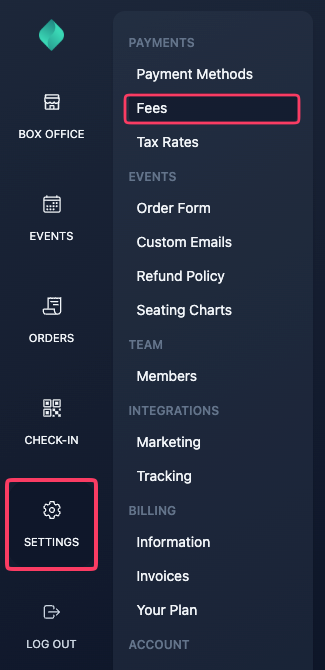
Step 2
To pass Tixtree's platform fee on to customers, select "Customers" in the "Platform fee" section.

Tixtree fees are transparent and well known in advance, if you decide they'll be covered by customers, they'll be automatically added to the order total without requiring any additional action from you.
Step 3 (Available until 1 November 2026)
To pass processing fees on to customers, select "Customers" in the "Processing fee" section

then enter a percentage fee, a fixed fee or both to cover processing costs
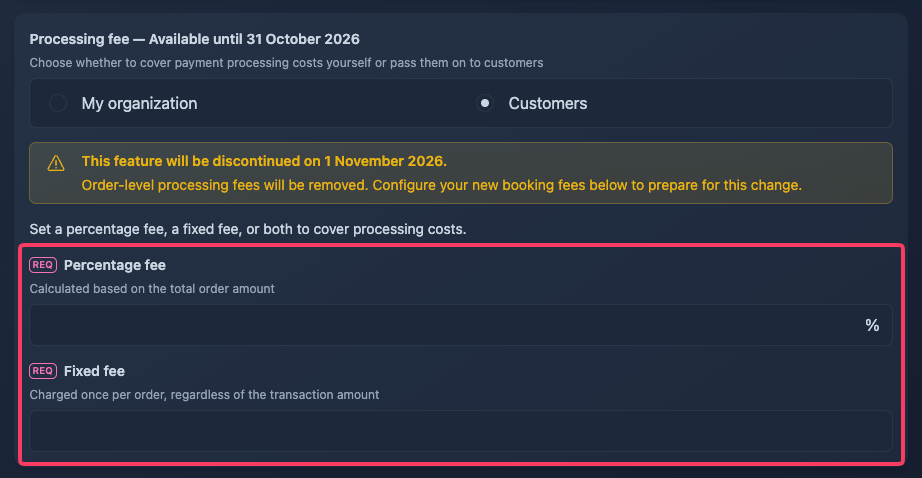
Please note: As explained in detail in this FAQ, order-level processing fees will be replaced by per-item booking fees starting 1 November 2026.
Processing Fee Calculation
The percentage fee and the fixed fee are factored into the final charge amount to ensure that you receive the desired amount, after the payment processor deducts the fee from the charge.
The formula applied is the following:
Order Total = (Organizer Desired Amount + Processor Fixed Fee + Tixtree Fixed Fee) / (1 - Processor Percentage Fee)
Step 3 (Available from 1 November 2026)
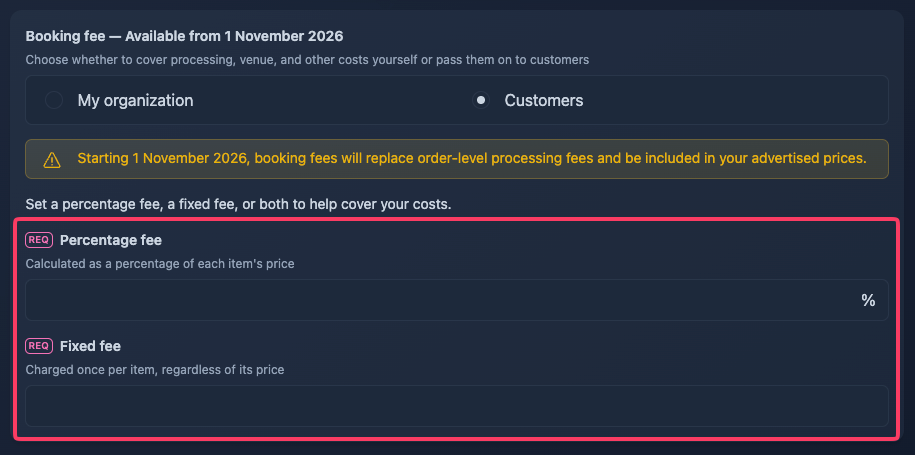
To pass processing, venue and other event-related costs on to customers, select "Customers" in the "Booking fee" section

then enter a percentage fee, a fixed fee or both to cover those costs
Booking Fee Calculation
The percentage fee and fixed fee are calculated for each ticket or item individually, rather than for the entire order.
Both fees are factored into the advertised price to help ensure that you receive your desired amount after the payment processor deducts its fees.
The formula applied to each item is:
All-In Item Price = (Organizer Desired Amount + Booking Fixed Fee + Tixtree Fixed Fee) / (1 - Booking Percentage Fee)
The resulting price includes the booking fee and Tixtree's platform fee (when passed on to customers), ensuring customers see the total price upfront.
Note: Actual earnings may vary depending on the payment processor's fees, payment method, and number of items purchased. Applicable taxes must also be accounted for when calculating the all-in price.
Step 4
Click save.
What are payment processing fees?
Payment processing fees are more complex than Tixtree's platform fee, as they vary depending on your payment processor, the country where your business is based, the currency of your tickets, and the payment method used by customers.
Before deciding whether to pass these fees on to customers, we recommend carefully reviewing your payment processor's pricing:
Unfortunately, our customer support team is unable to assist with interpreting payment processor pricing pages. If you need clarification, please reach out directly to Stripe or PayPal customer support.
Passing fees for a single event
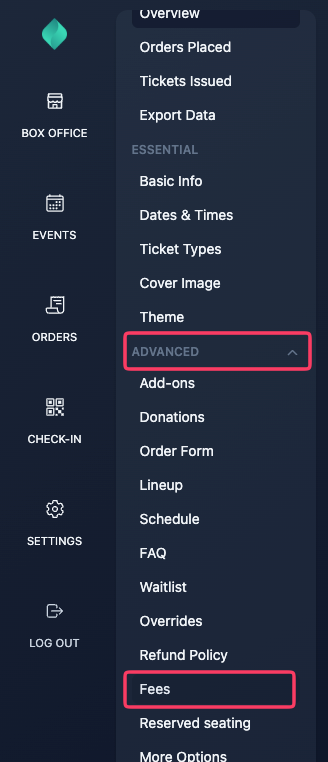
To pass on fees for all events except one (or vice versa), you can override the global setting at the event level by navigating to Advanced Options > Fees in your event overview.